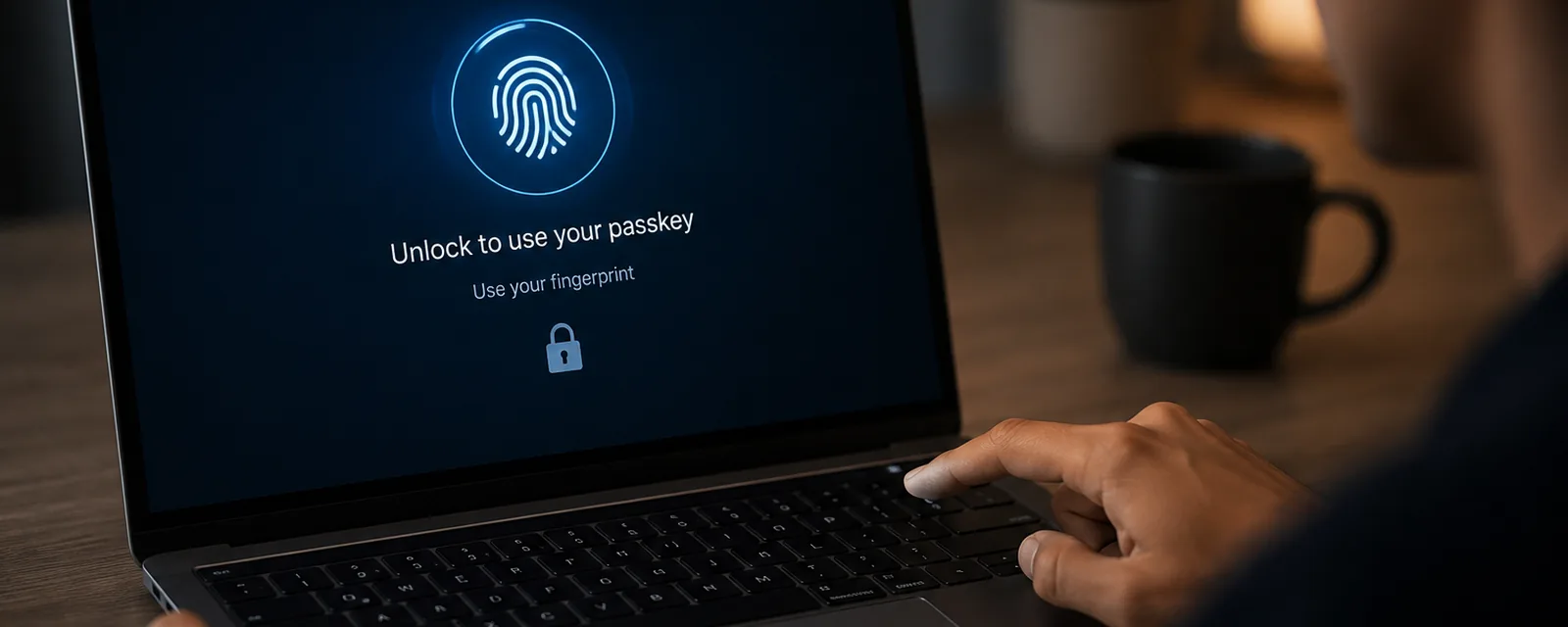
A prompt began appearing on my Mac. It did not look like cryptography. It looked like convenience: Touch ID, iCloud Keychain, a saved login, a small nudge away from passwords. But the prompt is only the surface. Underneath it is a public/private-key authentication ceremony.
The website is not asking the Mac to reveal a password. It is asking the device to prove control of a private key. The local unlock does not go to the website; it gates the signing operation on the device. That distinction is the whole story. A password login is built around a shared secret. A passkey login is built around a signature.
The prompt on the Mac is not the mechanism
When macOS asks for Touch ID or your login password before a passkey sign-in, it is putting a piece of UX in front of a signing operation. The biometric or the password is checked locally, by the device, to decide whether it will use a private key it already holds. None of that unlock material is transmitted to the site you are logging into. The server never sees your fingerprint, never sees your Mac password, and never receives anything it could replay as "the secret."
What the server receives is a signature, and some data describing exactly what was signed. Read a passkey login that way, as a constrained signing ceremony rather than a prettier password box, and the rest of the design falls into place.
Passwords are shared secrets
The password model is shared-secret verification. You know a secret; the server knows something derived from that secret; at login you present the secret and the server checks that its stored derivative matches. Salting and hashing change how the derivative is stored, and they matter a great deal for limiting the damage of a database leak, but they do not change the shape of the model. The user still presents a secret, and the server still verifies a function of that secret.
The consequence of that shape is that the verifying party must handle something that can be replayed. Anyone who obtains the secret, in transit, from a phishing page, or from the server's own store before it was hashed, can impersonate the user. The secret is the credential, and secrets travel.
Registration creates asymmetric state
A passkey begins with a registration ceremony, and the important thing about it is that it creates asymmetric state: two halves that are not interchangeable.
- The server generates a random challenge and sends it, along with information identifying the relying party (the site).
- The browser packages the request context, including the origin it is actually running on.
- The authenticator (the secure element on your device) generates a new key pair, typically on the P-256 elliptic curve, specific to this site.
- The authenticator keeps the private key. It does not leave the device in plaintext.
- The server stores the public key and a credential identifier.
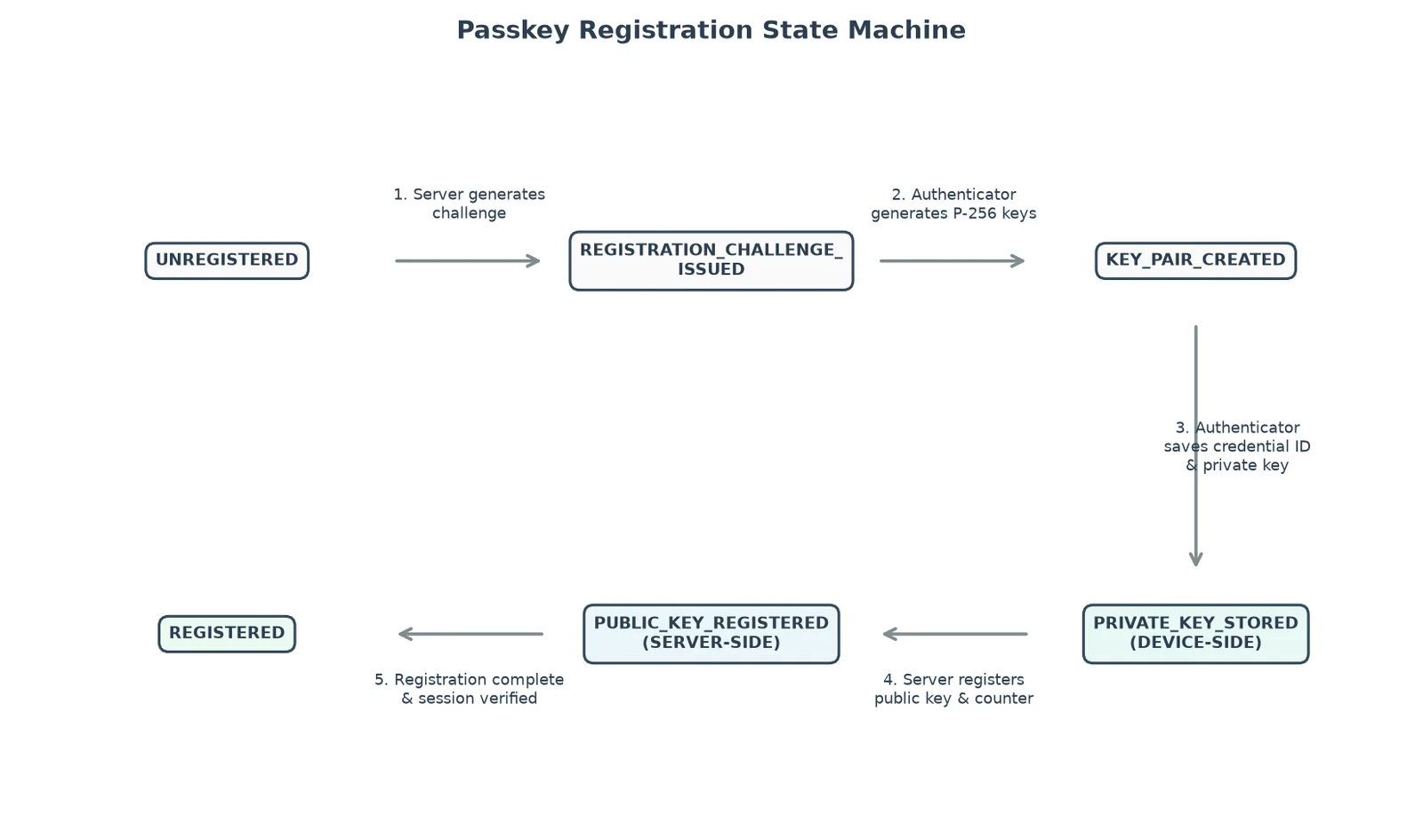
In the lab, the authenticator returns a fresh P-256 credential and the server records only its public half:
Credential ID: oEUSeMsTRQJgO0QeDY0Mfg
Public Key PEM:
-----BEGIN PUBLIC KEY-----
MFkwEwYHKoZIzj0CAQYIKoZIzj0DAQcDQgAEWStbebDjsDiBRGCWICypVHmW8zoo
dk1XQqGNhPEANYU9C/y2Z7k98ny5TsJ3LOpqvs7mFaG9ppFhNWjRS8dVag==
-----END PUBLIC KEY-----
Sign Counter: 0
After registration, the two sides hold fundamentally different things. The server holds material that can verify signatures. The authenticator holds material that can create them. That asymmetry is the entire security argument, so it is worth being precise about who ends up with what. The full registration trace, including the private-state the device keeps to itself, is here.
What the server stores
On the server side, a registered passkey is a small record:
- a user handle identifying the account
- the credential ID
- the public key
- the relying-party ID (the site the credential is bound to)
- a signature counter
None of that is a secret in the password sense. If it leaks, an attacker learns which public keys verify which accounts, which is not nothing, but it is not a credential. The server can verify signatures. It cannot create them. There is no stored value on the server that can be replayed as the user.
What the authenticator stores
On the device side, the authenticator holds:
- the credential ID
- the private key
- the relying-party ID it is bound to
- the user handle
- a signature counter
This is the signing authority. It is the only place the private key exists, and using it is exactly what the local Touch ID or password prompt gates. The device will produce a signature with this key only after that local check passes.
Authentication starts with a challenge
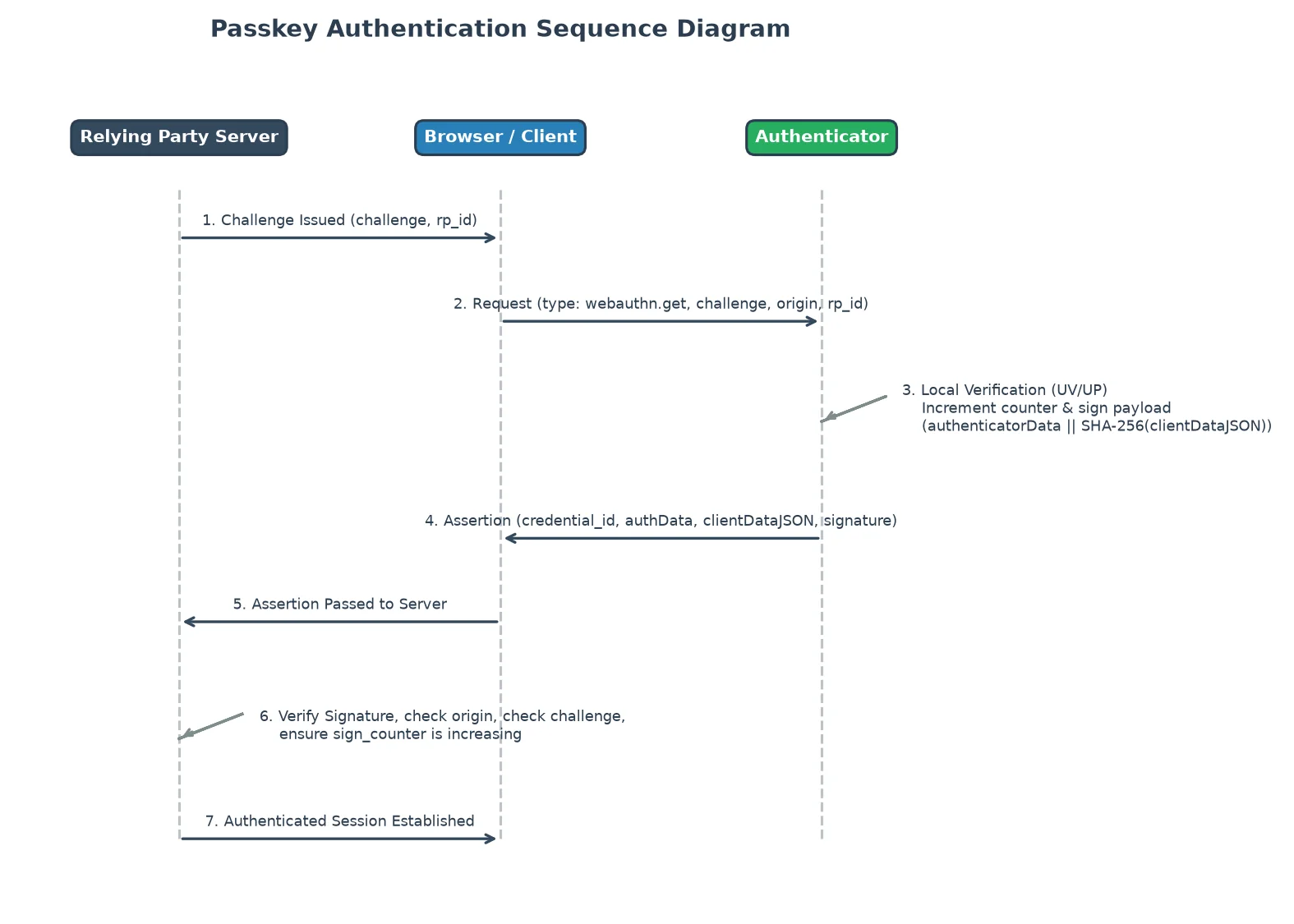
Every login begins with the server sending a fresh, random challenge. This is what makes a passkey assertion resistant to replay: a captured assertion is bound to the challenge it was created for, and that challenge will never be issued again. An attacker who records a valid login cannot resubmit it later, because the server is now expecting a different challenge and the old signature does not match the new one.
clientDataJSON binds browser context
During authentication, the browser assembles a small structure called clientDataJSON. It carries the browser-side context of the login. From an actual run:
{"challenge":"LAjE8sEVFmVCIrkwEvqv2iFFP1L37PnPl_uF8VICM1U",
 "origin":"https://rp.example.com",
 "type":"webauthn.get"}
The origin is the part that quietly defeats phishing. A fake page at a lookalike domain has a different origin from the real site, and that origin is baked into the data the authenticator signs. The user can be fooled by a convincing page; the origin field cannot.
authenticatorData binds relying-party and authenticator state
The authenticator contributes its own structure, authenticatorData, describing the relying party and the state of the authenticator itself. In the lab it is 37 bytes:
RP ID hash (32 bytes): fe828f3f47351b0833ab3076f76aa3f75e417db7ec028106bd325e80f025cad1
Flags      (1 byte):   0x05  (user present & user verified)
Sign counter (4 bytes): 0x00000001
Between them, clientDataJSON and authenticatorData pin down who the login was for, where it happened, and under what conditions. The signature is taken over both.
The signed payload
The authenticator does not merely sign the raw challenge. The signed payload is a specific construction:
signedPayload = authenticatorData || SHA256(clientDataJSON)
signature     = ECDSA_sign(private_key, signedPayload)
That construction is doing real work. clientDataJSON carries the browser-side context (type, challenge, origin); authenticatorData carries the relying-party and authenticator-side context (rpIdHash, flags, sign counter). The signature covers both, and every field changes the bytes that get signed:
- Change the challenge, and the hash of
clientDataJSONchanges. - Change the origin, and the hash of
clientDataJSONchanges. - Change the relying-party ID, and
authenticatorDatachanges. - Change the counter, and
authenticatorDatachanges.
In the lab, the two pieces concatenate into the exact bytes that get signed:
clientDataHash (SHA-256): 643e0038fd473427f0eee3ac1ef8c295cbcd87c7e3388b3b7d74434ef057366e
signedPayload (authenticatorData + clientDataHash):
  fe828f3f47351b0833ab3076f76aa3f75e417db7ec028106bd325e80f025cad1
  0500000001
  643e0038fd473427f0eee3ac1ef8c295cbcd87c7e3388b3b7d74434ef057366e
So the signature is not just proof that the device holds a private key. It is proof that the authenticator signed a particular authentication event, for a particular relying party, under a particular browser origin, in response to a particular server challenge. The signature is bound to its protocol context, which is exactly what a replayed or relocated assertion cannot reproduce. The full authentication trace, payload construction and all six server checks, is here.
Server verification is an ordered checklist
Verification on the server is not a single cryptographic act; it is a sequence of checks, and the order matters. A passkey assertion is accepted only if all of them pass:
- The credential ID exists and maps to a known account.
- The challenge matches the outstanding challenge the server issued.
- The origin matches the expected origin.
- The relying-party ID hash matches the expected relying party.
- The sign counter is greater than the previously stored counter.
- The signature verifies against the stored public key.
The signature check is last because the earlier checks establish that the signature is even about the right event. A cryptographically valid signature over the wrong origin or a stale challenge is still a rejected login.
Failure modes
Because verification is an ordered checklist, each way an attack can go wrong maps to a specific check that catches it:
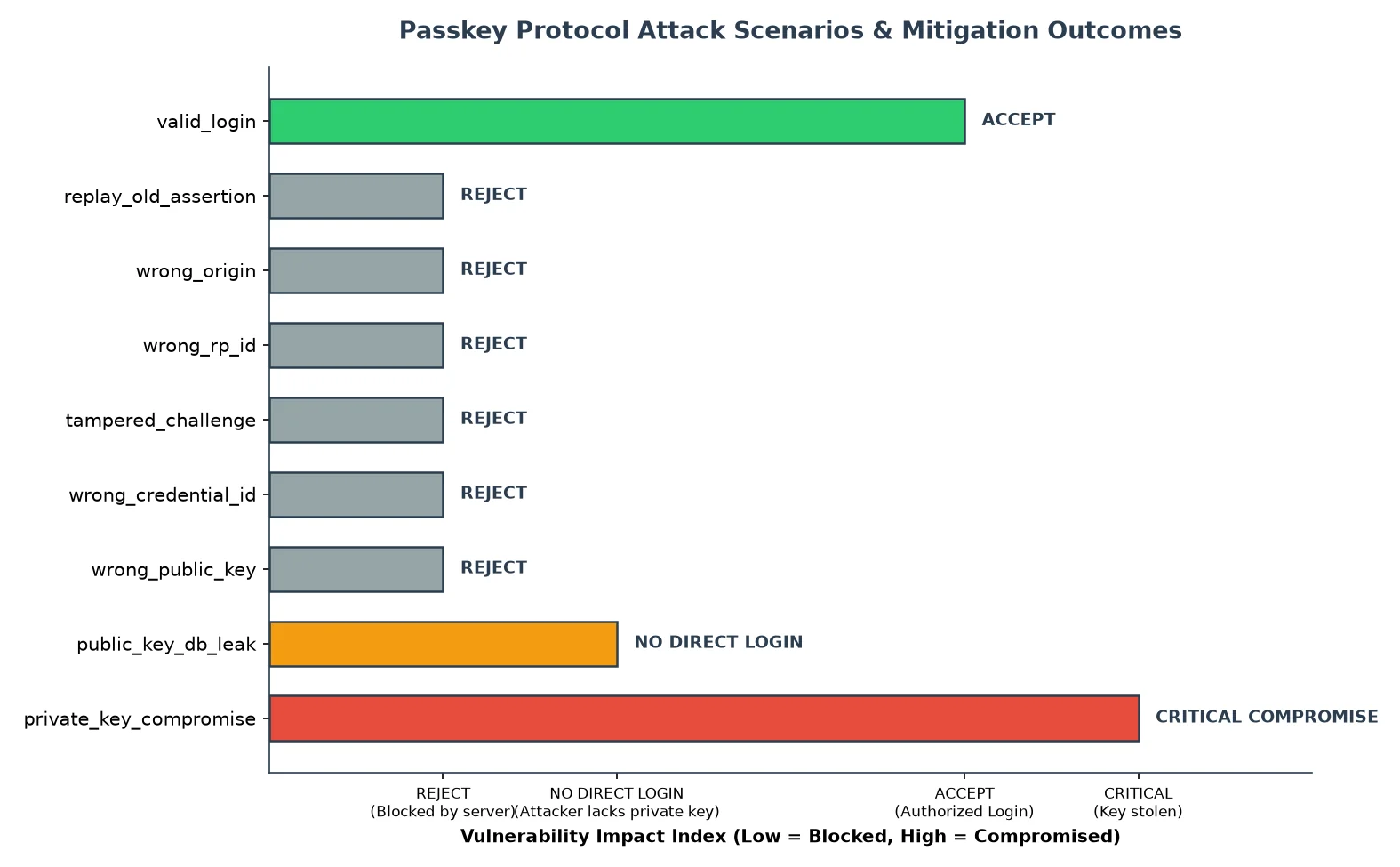
- Replayed assertion: the challenge no longer matches the outstanding one. Fails at the challenge check.
- Wrong origin (phishing page): the origin in
clientDataJSONdoes not match. Fails at the origin check. - Wrong relying-party ID: the rpIdHash in
authenticatorDatadoes not match. Fails at the RP ID check. - Tampered challenge: altering the challenge changes the signed bytes, so the signature no longer verifies. Fails at signature verification (and the challenge check).
- Wrong credential ID: no matching record. Fails at the first check.
- Wrong public key: the signature will not verify against it. Fails at signature verification.
- Public-key database leak: the attacker gains verification material, not signing material. There is nothing to replay; no check is even reached, because no valid new signature can be produced.
- Private-key compromise: this is the real failure. An attacker who extracts the private key from the device can produce valid assertions. Everything in the design is built to keep this from happening, which is why the private key stays in the authenticator and its use is gated locally.
The pattern is worth noting: almost every failure is caught by a protocol-context check well before cryptography is even in question. The one that isn't, private-key compromise, is the one the whole architecture is arranged to prevent. The complete matrix, with the actual rejection messages for each case, is here.
Trust boundaries
It helps to name the boundaries this system draws, because security is really a statement about what sits on each side of them:
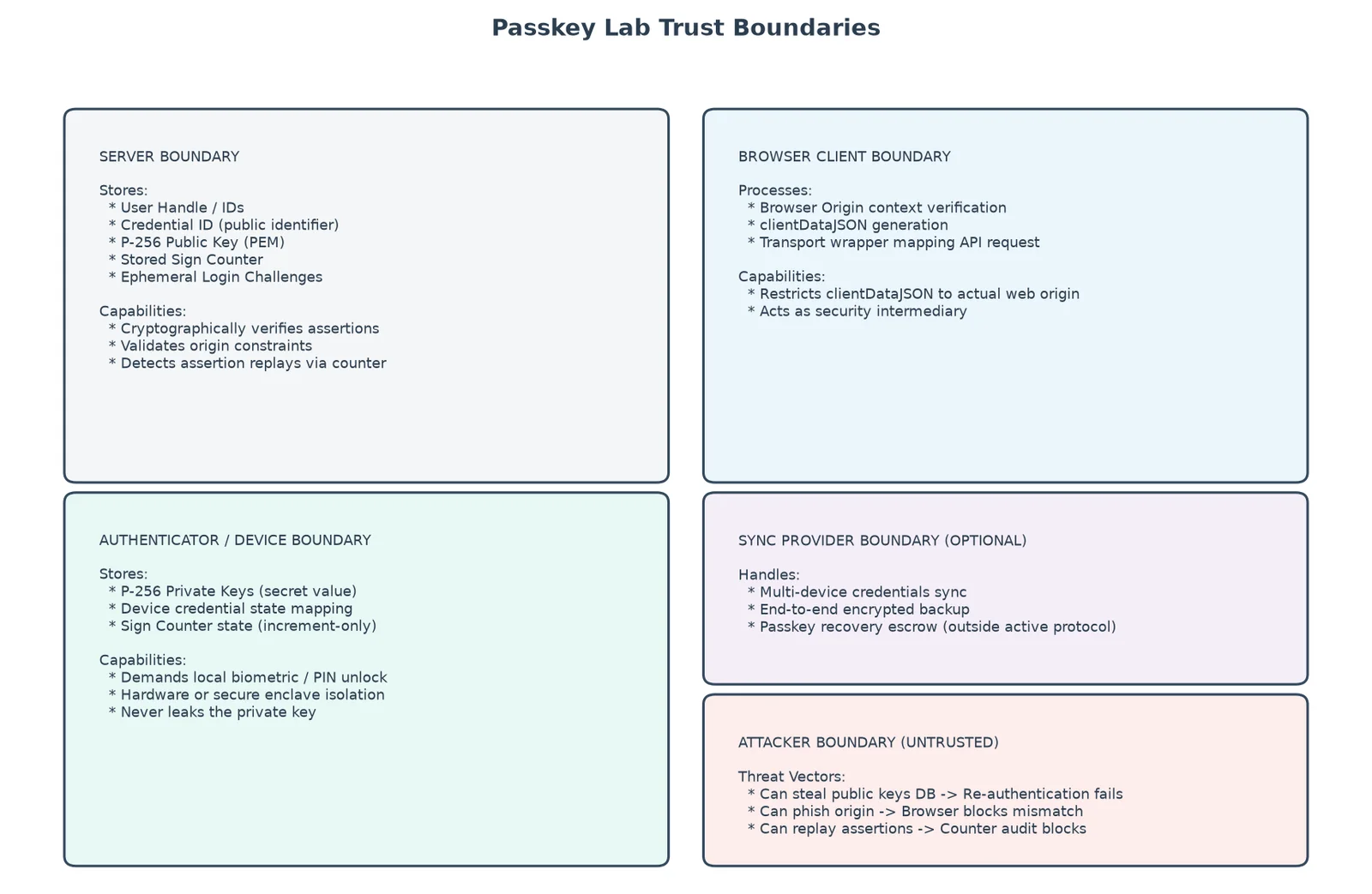
- Server boundary: holds public keys and can only verify. A breach here does not yield login credentials.
- Browser boundary: supplies and enforces origin, mediates between site and authenticator, but never holds the private key.
- Authenticator/device boundary: holds the private key and performs signing. This is the sensitive interior.
- Optional sync-provider boundary: if passkeys are synced, the credential provider participates in storing and recovering them.
- Attacker boundary: what an adversary can see and do from outside. In this model, mostly public material and rejected attempts.
Synced passkeys move the trust boundary
Synced passkeys, the kind that follow you across devices through iCloud Keychain or a similar provider, are a usability and recovery improvement, and a real one: they solve the "I lost my only device" problem that dogged earlier hardware-bound credentials. But they do not come for free. Syncing moves part of the trust model to the credential provider and to the account-recovery process that can restore those credentials.
This is neither magic nor automatically bad. It is a changed boundary. A device-bound passkey trusts the device. A synced passkey additionally trusts the provider's storage and the strength of the recovery path that can re-materialise the private key elsewhere. Whether that trade is worth it depends on the threat you are defending against, but it should be made with the boundary shift in view, not hidden by the convenience.
Why this matters beyond login
The reason passkeys are worth understanding at this level is narrow and, I think, real: they make private-key proof-of-control an ordinary experience for ordinary users. For most people, this is the first time controlling a private key, and proving that control without ever revealing it, is a routine daily act rather than a specialist one.
That same pattern, prove control of a private key without disclosing it, is the mechanism underneath SSH keys, code signing, cryptocurrency wallets, verifiable credentials, and the authorization systems being built for software agents. Passkeys are not those things, but they normalise the shape those things depend on. Learning to read the passkey ceremony is learning to read a pattern that keeps recurring.
The traces
Every value quoted above comes from a small Python lab that simulates the ceremony end to end. The full traces: